About Our Morse Code Image Translator
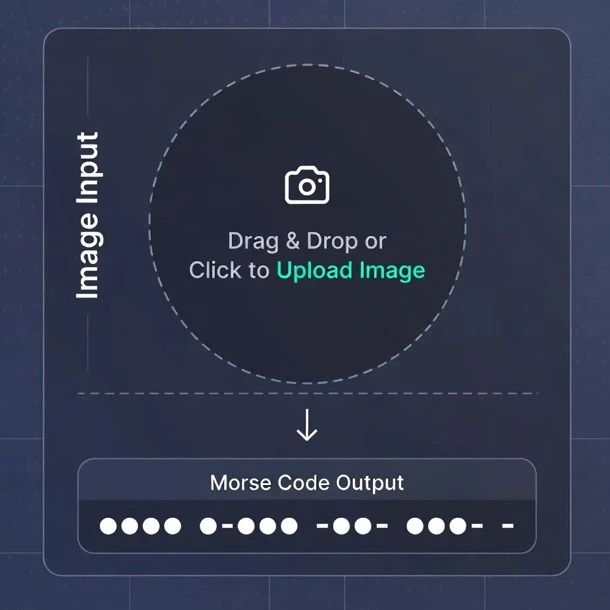
Our free morse code decoder from image supports many languages. The morse code translator image to text is an advanced online tool that uses AI-powered OCR (Optical Character Recognition) to read the text or Morse code patterns inside your images. It extracts text using OCR and translates it into morse code instantly. It works in two ways: Image Text to Morse Code or Image Morse Code to English Text easily.
Whether you're working on a project, solving a puzzle, learning Morse code, or simply sending secret messages, historical telegraph documents, vintage military communications, amateur radio reference materials, our tool gives you instant, accurate converts visual dots (.) and dashes (-) into readable text with no manual effort. Our advanced OCR technology tool can accurately convert photos to Morse code and instantly decode the hidden messages within your images.
Advanced Image Processing Capabilities
Our Image to Morse Code Translator is built with powerful OCR technology using advanced machine learning algorithms and image recognition that supports any type of photograph. Our tool ensures accurate detection and conversion every time.
Supported Image Types
- Scanned Documents: Instantly process old training manuals, historical telegrams, technical reference sheets and military records.
- Photographs: Convert Morse code from handwritten notes, photos of charts, signal boards, and physical displays.
- Digital Displays: Extract and translate Morse code from online tutorials, software interfaces, and digital screen shots.
- Printed Materials: Translate Morse code from books, magazines, posters, newspapers, and educational charts.
- Handwritten Materials: Read personal notes, classroom practice sheets, training exercises, and student study guides with high accuracy.
Professional and Educational Applications
Our tool builds trust in professionals and educational institutes worldwide. This tool challenges the real-world where accuracy, reliability, and speed matter.
- Historical Research & Archiving: Digitise vintage telegraph messages, military signal records, and rare communication archives.
- Educational Institutions & Training Centres: Convert textbook exercises, assignments, exam sheets, and practice materials into digital Morse code instantly.
- Amateur Radio & Ham Radio Community: Translate printed signal references, contest logs, and training materials with ease.
- Museums & Cultural Preservation: Preserve historic maritime, aviation, and wartime Morse communication records into readable text.
- Emergency & Disaster Response Training: Prepare rescue training material, communication drills, and official documentation quickly and securely.
How Our Smart Image Translator Works
Our powerful image morse code tool uses specialized systems to handle both types of visual translation. It combines advanced computer vision algorithms with specialized Morse code pattern recognition to transform visual content into readable text messages.
Analyzing Text in Image to Morse Code (Encoding)
This function is perfect for converting documents, screenshots, or signs.
- Optical Character Recognition (OCR): Our advanced OCR engine scans the image, recognizing standard Latin alphabet letters, numbers, and punctuation.
- Text Extraction: The recognized text is accurately extracted into the Extracted Text box.
- Morse Encoding: The extracted plain text is then instantly converted into the standardized International Morse Code sequence of dots (·) and dashes (-).
Decoding Visual Morse Code to Plain Text (Decoding)
This is our specialized feature, ideal for historical or symbolic translation.
- Pattern Recognition Engine: This engine is specifically trained to recognize the visual patterns of long (dash) and short (dot) elements, even when they are part of a photograph, drawing, or faint signal.
- Code Translation: It accurately translates the recognized patterns back into the corresponding letters and numbers, providing you with the clear, readable message in the box.
How to Use Our Morse Code Image Translator? Step by Step Guide
- Step 1: Select the image in the right hand box for photo translation or select text to encode into morse code and you can also enter the morse code by selecting the morse code decoding into english text.
- Step 2: Simply drag or upload the image you want to translate into morse code or vice versa. Then click on the button name "process image".
- Step 3: Our unique translating tool processes the photo then extracts the text from the image or morse code into the left box.
- Step 4: You can see the results in the output box, you can copy it by clicking on the copy button, it also provides audio of morse code or readable english text, you can listen to it by clicking on the audio button.
Advanced Features and Benefits
Image Processing
- Automatic contrast adjustment
- Perspective color correction
- Background noise removal
- Resolution enhancement
- Color space optimization
- Edge detection
Recognition Technology
- 95%+ accuracy rate
- Multi-stage validation
- Error detection & correction
- Confidence scoring
- Manual override option
- Real-time processing
Why Choose Our Image Decoder?
Our enhanced recognition image decoder can work on various image formats including PNG, JPEG, GIF, and TIFF files, automatically converting visual Morse patterns into accurate readable text or text to morse code patterns with industry-leading precision rates.
It employs multi-function working techniques including image preprocessing, noise reduction, character segmentation, and pattern matching to ensure accurate results across low quality images. From low-resolution historical photographs to high-definition scanned documents, our picture morse code decoder tool is designed to deliver high quality results and performance regardless of source picture quality.
Smart Recognition
The detection of dots and dashes, automatic spacing recognition, and noise filtering are critical processes in accurately deciphering Morse code signals.
Flexible Output
"Copy to clipboard," "export as TXT/JSON," "confidence scores," and "raw OCR display" are all standard features designed to help users interact with and manage the output of an Optical Character Recognition (OCR) system.
Instant Processing
Get results in seconds, not minutes
100% Private
All processing happens on your device
95%+ Accuracy
Advanced OCR with Morse recognition
Tips for Best Results
- Use high contrast: Black text on white background works best
- Ensure clarity: Make sure dots and dashes are distinct and well-separated
- Minimize backgrounds: Avoid complex or decorative elements
- Try PNG format: PNG typically works better than JPEG for text
- Check resolution: Use clear, high-quality images when possible
Our Other Morse Translator